


Create. Track. File. Grow — NextBill Handles Your Numbers So You Can Focus on Business
GST Calculator

How does NextBill help you to file GST?
You can use GST calculator from NextBill website in simple steps: You have to simply
- Auto-fetches data from your invoices.
- Prepares GSTR-1, GSTR-3B & NIL returns.
- Match sales & purchase entries.
- One-click GST filing from dashboard.
- No manual work, no errors.
- 100% GSTN-compliant process.
- File monthly or quarterly with ease.
What is GST, and its application?
Goods and Services Tax (GST) is an indirect tax charged on the provision of goods and services. It has replaced various indirect taxes like Value Added Tax (VAT), sales tax, and purchase tax, among others. The GST law was passed by Parliament on March 29, 2017, and came into force on July 1, 2017. In this single domestic indirect tax regime, GST is charged at the time of sale across the nation.
How to use a GST calculator?
Using a GST amount calculator enables you to determine the tax payable simply by going through a simple process.
- Select between GST Inclusive or GST Exclusive according to your requirement.
- Enter the starting amount.
- Choose the relevant GST rate; there is a list of pre-defined GST rates in this tool, so there is no need to look for a GST rate finder.
- Click on Calculate to see the result. The result will show both the total sum and the pre-GST/post-GST amounts based on your original stipulations.

What is GST inclusive and GST exclusive?
GST Inclusive means the price already includes GST — you don’t add extra tax on top. For example, if something costs ₹1,000 inclusive of 18% GST, the tax is already part of the ₹1,000.
GST Exclusive means GST is added over the base price. So, if an item is ₹1,000 exclusive of 18% GST, the final amount becomes ₹1,180.
Inclusive keeps things simple for customers, while exclusive is useful for clear tax reporting in business.
How to calculate GST Inclusive and Exclusive?
1. GST Inclusive Formula
- Total price = ₹1,180
- GST Rate = 18%
GST Amount= 1180 × [18 ÷ (100 + 18)] = 1180 × 18/118 = ₹180
Base Price= 1180 − 180 = ₹1,000
2. GST Exclusive Formula
- Base price = ₹1,000
- GST Rate = 18%
GST Amount= (1000 × 18) ÷ 100 = ₹180
Total Price= 1000 + 180 = ₹1,180
How to calculate Goods and Services Tax?

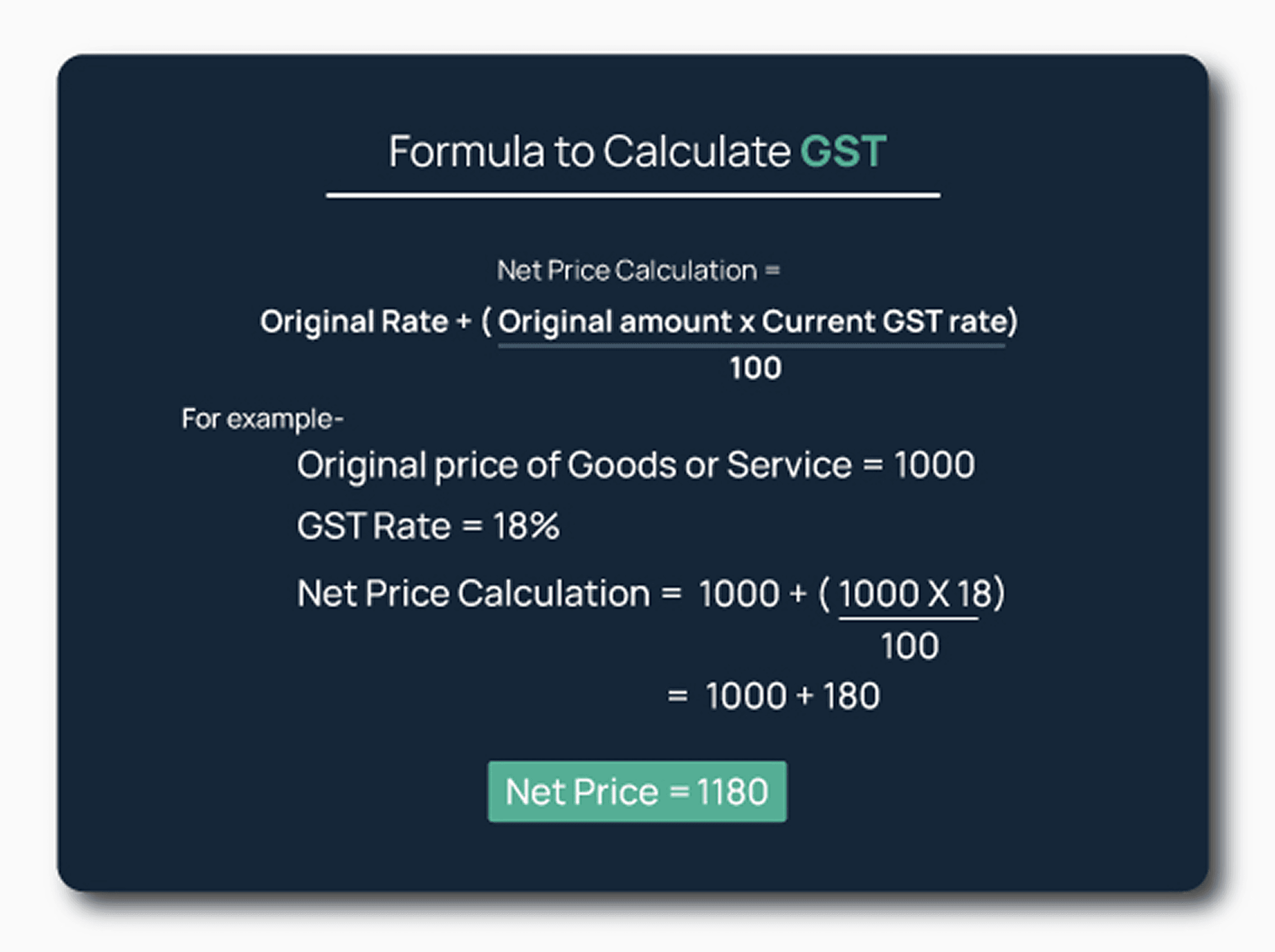
As a taxpayer, you must know the factors in every way, all the exempted goods, eligible ineligible ITC, and inter-state sales. One of the most important advantages of GST rates is that you can avoid paying an 18% interest rate, which you will have to pay in case when you pay less than you are supposed to pay.

Frequently asked questions
What is GSTIN?

GSTIN stands for Goods and Services Tax Identification Number. It is a unique 15-digit alphanumeric code assigned to every business or individual registered under the GST framework in India.
What is the structure of GSTIN?
The 15-digit format represents specific details of the registered entity: 1. Digits 1–2: State code (e.g., 29 for Karnataka). 2. Digits 3–12: 10-character Permanent Account Number (PAN) of the business. 3. Digit 13: Number of registrations a business has within that same state. 4. Digit 14: Letter 'Z' (Default placeholder). 5. Digit 15: Checksum character (an alphabet or a number) to detect errors.
How does the NextBill GSTIN Calculator work?
Simply paste any 15-digit GST number into the tool. It live-checks government registries to instantly show the business name, registration date, and active/inactive status.
Can I use this tool to calculate invoice GST rates?
This tool verifies the GSTIN itself. However, NextBill’s invoicing software automatically applies the correct CGST, SGST, or IGST rates based on the verified state code.
How do I verify if a GSTIN is active or cancelled?
Enter the number into our search tool. It will instantly flag whether the GSTIN is Active, Suspended, or Cancelled, helping you avoid non-compliant vendors.
Why should I check a vendor's GSTIN before buying?
If a vendor's GSTIN is cancelled or inactive, their bills won't show in your GSTR-2B. This means your business loses its Input Tax Credit (ITC) and loses money.
What happens if I enter an incorrect GSTIN on an invoice?
A wrong GSTIN blocks your customer from claiming ITC and triggers automated portal errors. NextBill solves this by live-validating customer GSTINs before you create a bill.
Is this GSTIN verification tool free to use?
Yes, NextBill's online GSTIN lookup tool is 100% free. You can run unlimited searches without creating an account or linking a credit card.
How can I find a company's name using a GST number?
Just enter the 15-digit ID into the NextBill search bar. The tool decodes the number to instantly reveal both the legal business name and trade name.
What is the difference between Legal Name and Trade Name?
The legal name is the official name registered under the PAN (e.g., ABC Enterprise Pvt Ltd). The trade name is the casual brand name used for operations (e.g., ABC Stores).
How does a GSTIN tell you to charge CGST/SGST or IGST?
If the first 2 digits (state code) match your location, it’s a local sale requiring CGST + SGST. If the state codes are different, NextBill automatically applies IGST.
Can a single business have more than one GSTIN?
Yes. A business needs a separate GSTIN for every Indian state it operates in. It can also get separate GSTINs for different business verticals within the same state.
How accurate are the GSTIN lookup results?
The NextBill tool pulls data directly via secure live APIs connected to the government database, ensuring your verification data is always current.
How do I turn a verified GSTIN into a tax invoice?
Once verified, move to the NextBill invoice generator. Entering the GSTIN will auto-populate the client's name, address, and correct tax logic for instant billing.
Payments and Accounting, finally in sync
NextBill AI transforms payment reconciliation from a tedious task into a one-click process.
It auto-matches transactions, create payments, and highlights only what needs your attention — giving you clarity and control like never before.